Work with Consumption reports
Consumption Reports help you track how much your organization is using DocEdge page processing and LLM tokens across workflows. As you scale document automation and GenAI-powered processes, these reports give you the visibility you need to manage usage-based costs effectively. You can view overall DocEdge page consumption, workflow-level summaries, Process Studio page consumption details, and LLM token breakdowns by provider, model, and operation type — such as summarization, classification, or AI Agent usage. Flexible duration options let you generate reports for the last 1, 3, or 6 months, the current calendar year, or a custom date range. Use these reports to attribute costs to specific workflows or users, identify high-consumption processes, and make informed decisions about model selection and prompt optimization.
To generate Consumption report:
- In the menu, click Reports → Consumption. The Consumption page appears.
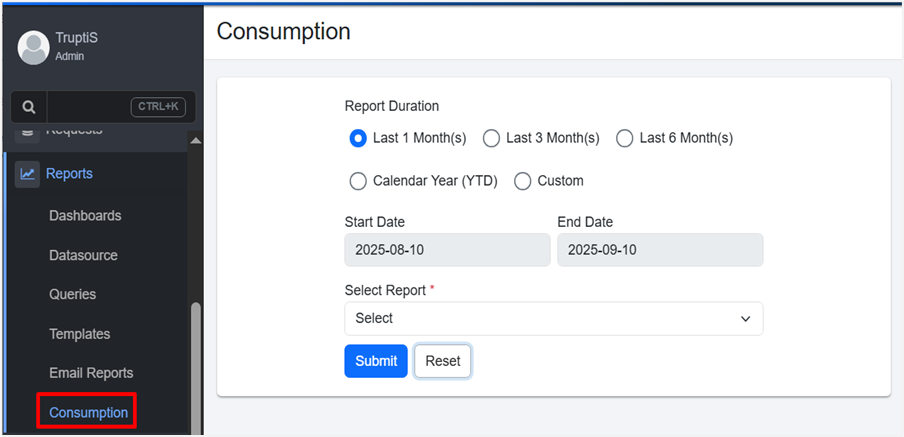
Consumption report page view
-
In the Report Duration section, select the duration for which you want to generate the report:
- Last 1 Month(s): Generate the report for the last one month.
- Last 3 Month(s): Generate the report for the last three months.
- Last 6 Month(s): Generate the report for the last six months.
- Calendar Year (YTD): Generate the report for the calendar year, including the current date and year.
- Custom: Generate the report for a specific period of days, weeks, months, or years.
In the Start Date and End Date fields, set the start and end date for generating the report.
-
In the Select Report list, choose the report you want to generate. The following reports are available:
- DocEdge-Pages Consumption Report
- Workflow DocEdge-Pages Consumption Summary Report
- ProcessStudio DocEdge-Pages Consumption Report
- Click Submit. The report appears.
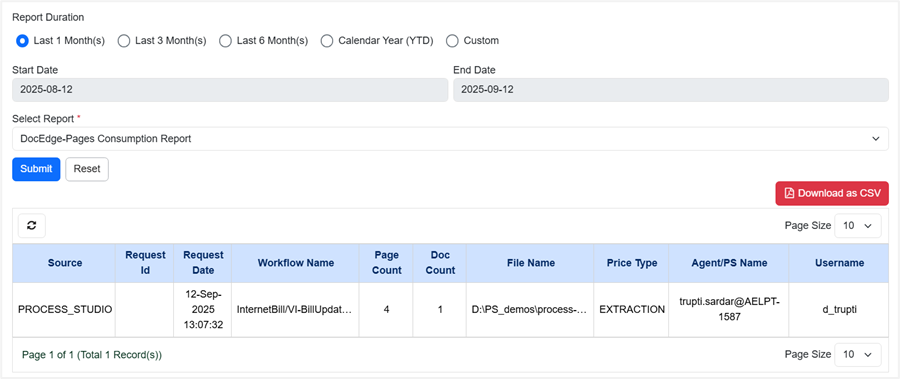
Report Duration selection
- View the following report details:
- For DocEdge-Pages Consumption Report:
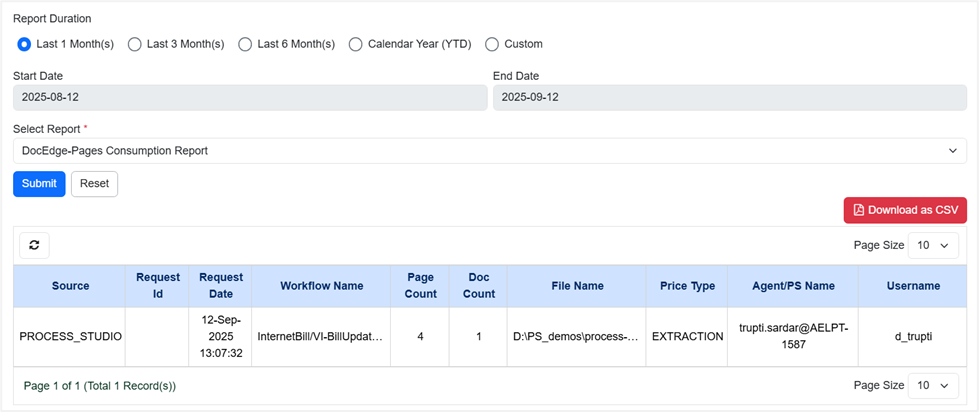
DocEdge-Pages Consumption Report view
| Column name | Description |
|---|---|
| Source | Displays the origin of the request (for example, PROCESS_STUDIO). |
| Request Id | Displays a unique identifier assigned to each request. |
| Request Date | Displays the date and time when the request was created. |
| Workflow Name | Displays the name of the workflow associated with the request. |
| Page count | Displays the total number of pages from which data is extracted. |
| Doc Count | Displays the total number of documents in the request. |
| File Name | Displays the name and path of the input file of the workflow. |
| Price Type | Displays the type of processing applied (for example, EXTRACTION). |
| Agent/PS Name | Displays the agent or process studio instance where the request was executed. |
| Username | Displays the name of the user who initiated the request. |
- For Workflow DocEdge-Pages Consumption Summary Report:
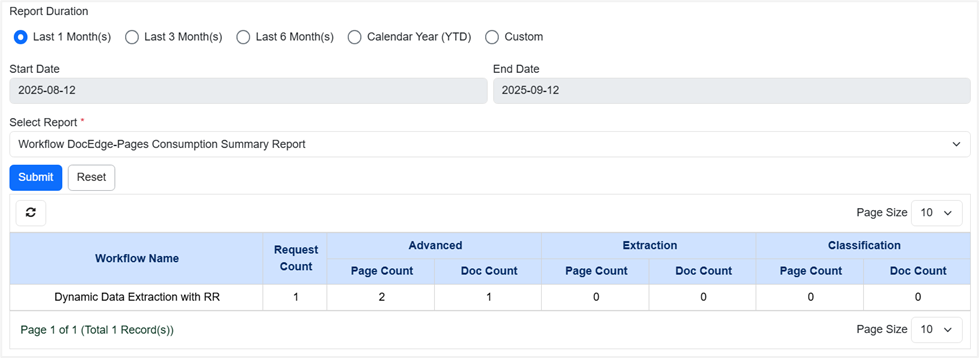
Workflow DocEdge-Pages Consumption Summary Report view
| Column name | Description |
|---|---|
| Workflow Name | Displays the name of the workflow. |
| Request Count | Displays the total number of requests executed for the workflow. |
| Advanced – Page Count | Displays the total number of page count consumed by the Plugin steps DocEdge: GenAI and DocEdge: Azure OCR. |
| Advanced – Doc Count | Displays the total number of documents processed by the Plugin steps DocEdge: GenAI and DocEdge: Azure OCR. |
| Extraction – Page Count | Displays the total number of page count consumed by the Plugin steps DocEdge: Get Value, DocEdge: Get Table, and DocEdge: Azure OCR. |
| Extraction – Doc Count | Displays the total number of documents processed by the Plugin steps DocEdge: Get Value, DocEdge: Get Table, and DocEdge: Azure OCR. |
| Classification – Page Count | Displays the total number of page count consumed by the Plugin step DocEdge: Classify Documents. |
| Classification – Doc Count | Displays the total number of documents processed by the Plugin step DocEdge: Classify Documents. |
- For Process Studio DocEdge-Page Consumption Report:
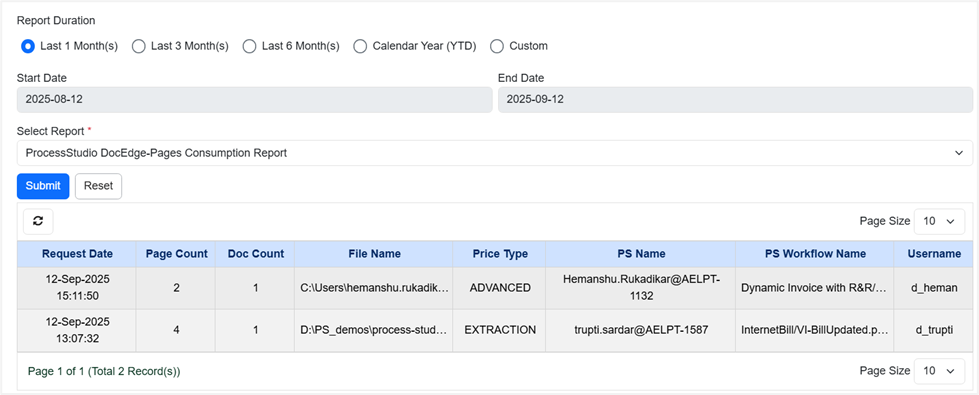
ProcessStudio DocEdge-Pages Consumption Report view
| Column name | Description |
|---|---|
| Request Date | Displays the date and time when the request was created. |
| Page Count | Displays the total number of pages from which data is extracted. |
| Doc Count | Displays the total number of documents in the request. |
| File Name | Displays the name and path of the input file of the workflow. |
| Price Type | Displays the type of processing applied (for example, EXTRACTION). |
| PS Name | Displays the agent or process studio instance where the request was executed. |
| PS Workflow Name | Displays the name assigned to the workflow in Process Studio. |
| Username | Displays the name of the user who initiated the request. |
- For LLM Tokens Consumption Report:
The Consumption tab provides a detailed view of report usage, including page usage and LLM token consumption.
Each time a workflow step invokes an LLM, the system creates a new entry in the table, even when the same LLM provider is used. Consumption is recorded at both the row level and the step level. As a result, workflows that include multiple steps or process multiple rows generate multiple records under the same request ID.
Multiple entries for the same step may appear in this table, this occurs when a step is called repeatedly within a workflow with similar type of input and output. LLM token counts are approximate and not exact.
The Total Token count reflects all token types consumed during a workflow. As a result, this value may exceed the combined sum of Input and Output tokens alone. For example, if a process utilizes Input, Output, and Thinking tokens, the Total Token value will be the cumulative sum of all three.
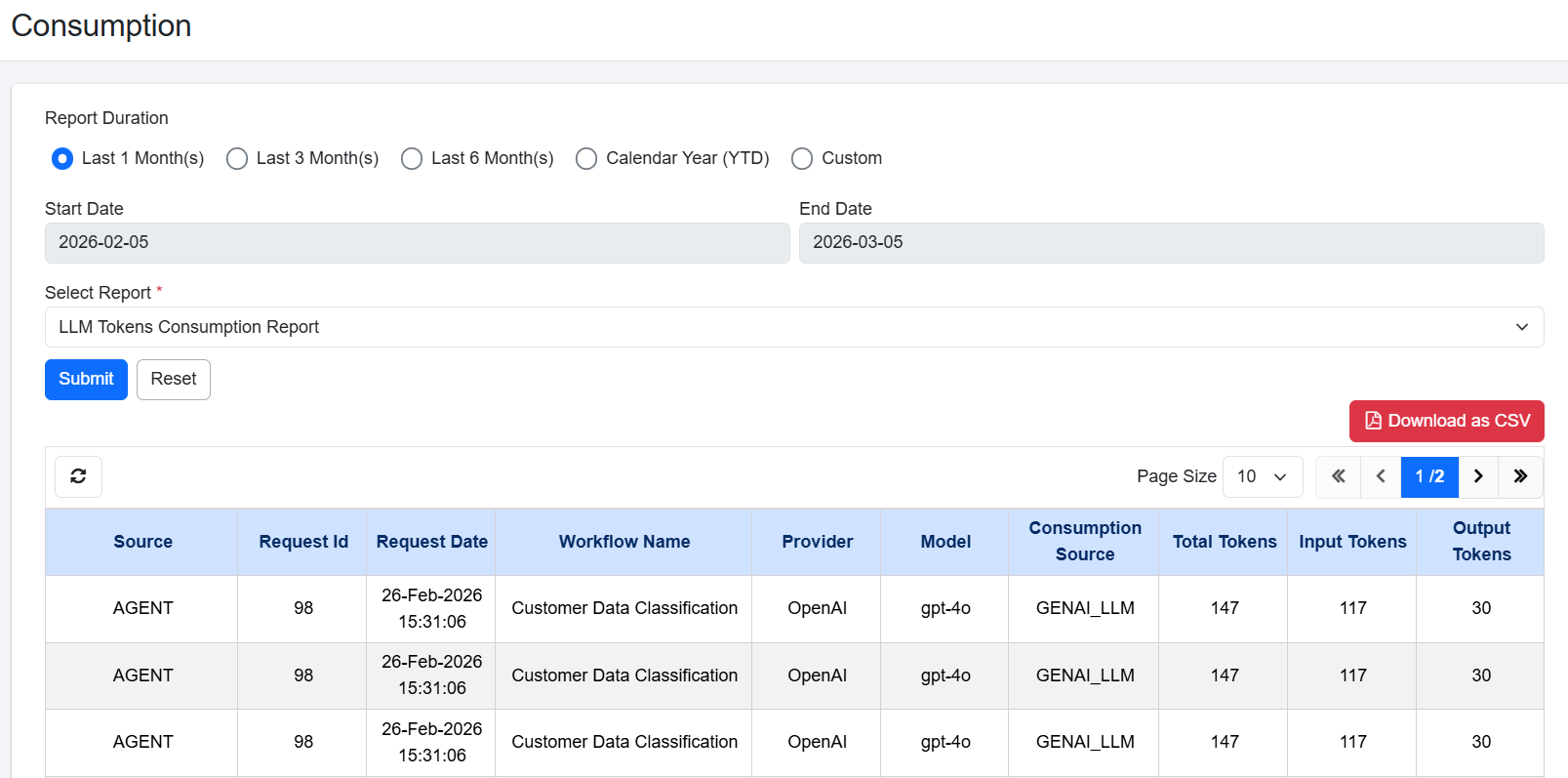
LLM Tokens Consumption Report view
| Column name | Description |
|---|---|
| Source | Displays the origin of the request (for example, PROCESS_STUDIO). |
| Request Id | Displays a unique identifier assigned to each request. |
| Request Date | Displays the date and time when the request was created. |
| Workflow Name | Displays the name of the workflow that used LLM tokens. |
| Provider | Displays the name of the LLM service provider that processed the request. For example, OpenAI. |
| Model | Displays the specific LLM model used to process the request. For example, gpt-5.2. |
| Consumption Source | Displays the type of GenAI operation that consumes tokens. It indicates the purpose for which the LLM is invoked. For example, GENAI_SUMMARIZATION: Tokens used for summarizing text/data, GENAI_CLASSIFICATION: Tokens used for categorizing or labelling data, GENAI_LLM: Tokens used for General-purpose LLM usage, GENAI_AI_AGENT: Tokens used by an AI Agent workflow, ADVANCED: Token consumption coming from DocEdge-based processing. |
| Total Token | Displays the total number of tokens consumed by the request. |
| Input Token | Displays the number of tokens used by the text or prompt that you send to the LLM. |
| Output Token | Displays the number of tokens used by the response generated by the LLM. |
- For Workflow-wise LLM Tokens Consumption Summary Report:
Workflow-wise LLM tokens consumption summary report displays the total LLM token consumption grouped by workflow. Use this report to compare token usage across workflows, identify high-consumption processes, and plan for cost optimization. Workflow-wise LLM Tokens Consumption Report includes only those workflows that have been executed on the server.
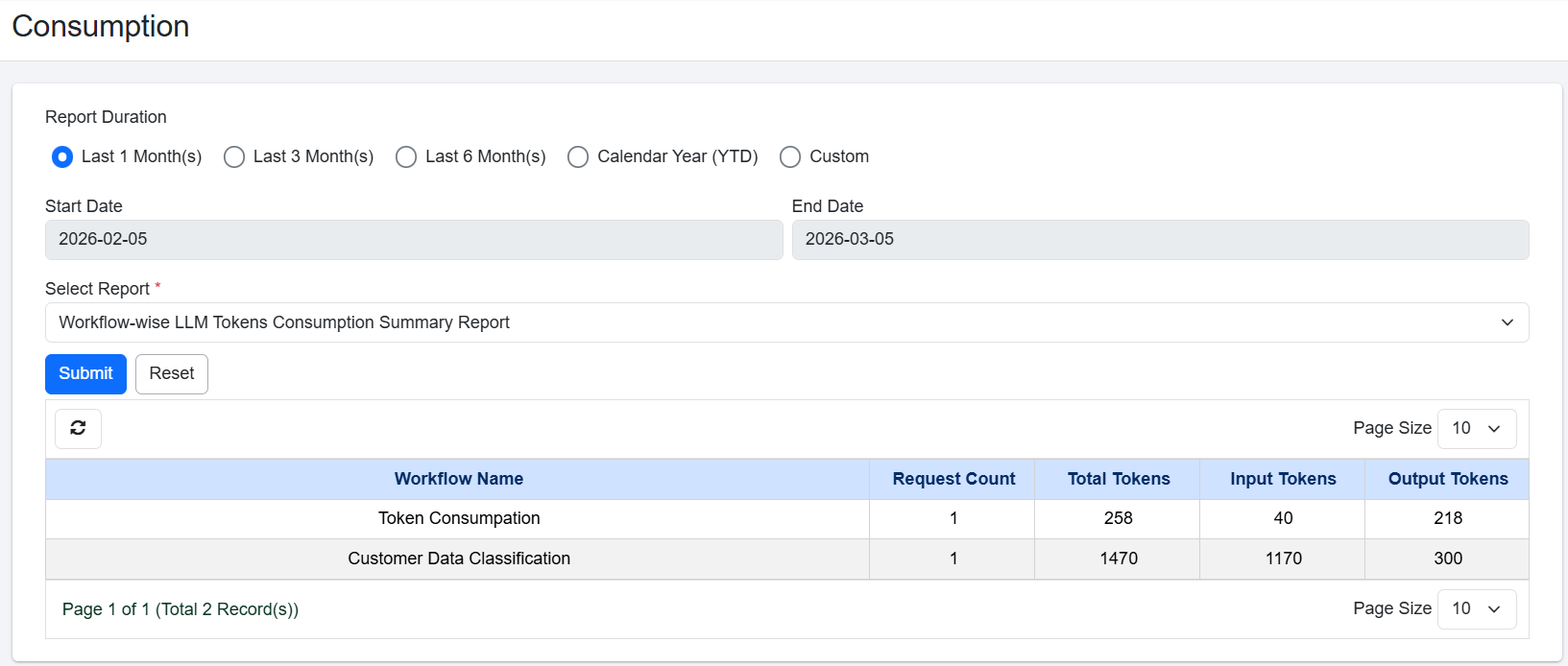
Workflow-wise LLM Tokens Consumption Summary Report view
| Column name | Description |
|---|---|
| Workflow Name | Displays the name of the workflow that used LLM tokens. |
| Request Count | Displays the total number of times the workflow was executed. |
| Total Token | Displays the total number of tokens consumed by the request. |
| Input Token | Displays the number of tokens used by the text or prompt that you send to the LLM. |
| Output Token | Displays the number of tokens used by the response generated by the LLM. |
- For Process Studio LLM Tokens Consumption Report:
Process Studio LLM Tokens Consumption displays LLM token consumption exclusively for workflows executed in Process Studio. Use this report when you need to isolate Process Studio token costs from other sources.
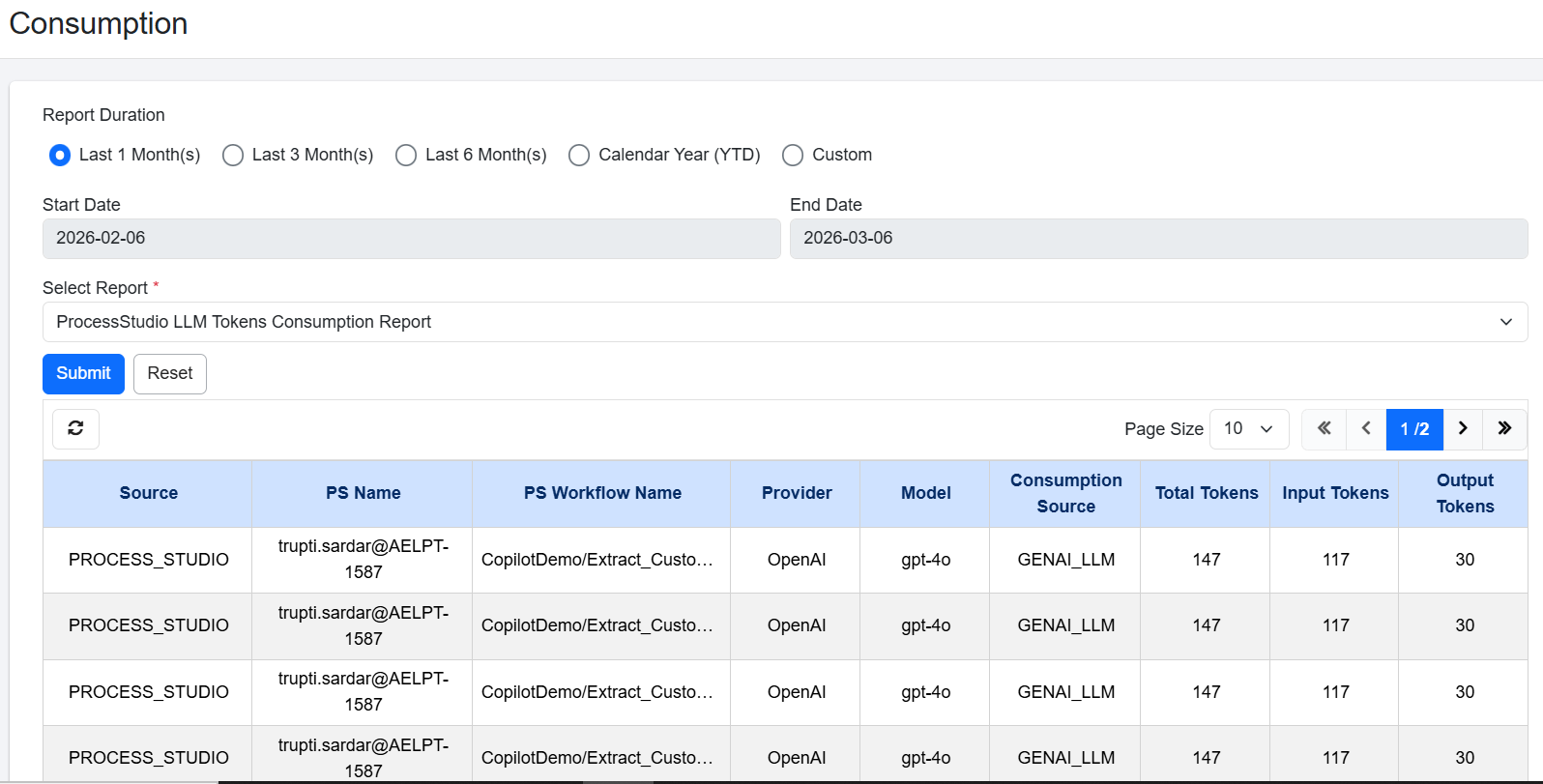
Process Studio LLM Tokens Consumption Report view
| Column name | Description |
|---|---|
| Source | Displays the origin of the request (for example, PROCESS_STUDIO). |
| PS Name | Displays the Process Studio name from which the request was executed. |
| PS Workflow Name | Displays the name of the Process Studio workflow that used LLM tokens. |
| Provider | Displays the name of the LLM service provider that processed the request. For example, OpenAI. |
| Model | Displays the specific LLM model used to process the request. For example, gpt-4.1. |
| Consumption Source | Displays the type of GenAI operation that consumes tokens. It indicates the purpose for which the LLM is invoked. For example, GENAI_SUMMARIZATION: Tokens used for summarizing text/data, GENAI_CLASSIFICATION: Tokens used for categorizing or labelling data, GENAI_LLM: Tokens used for General-purpose LLM usage, GENAI_AI_AGENT: Tokens used by an AI Agent workflow, ADVANCED: Token consumption coming from DocEdge-based processing. |
| Total Token | Displays the total number of tokens consumed by the request. |
| Input Token | Displays the number of tokens used by the text or prompt that you send to the LLM. |
- For Request-wise LLM Token Consumption Report:
This report provides a detailed view of LLM token consumption for each individual request. The report includes expandable rows. When you click a Request ID, the row expands to show additional details such as the provider, model, and token usage. You can click on Total Tokens to see detailed view of LLM Token Consumption.
Each LLM provider is recorded as a separate entry. If the same provider is used with different models, the system records each provider–model combination as a separate entry. This structure helps you clearly identify how tokens are consumed across different providers and models within a single request.
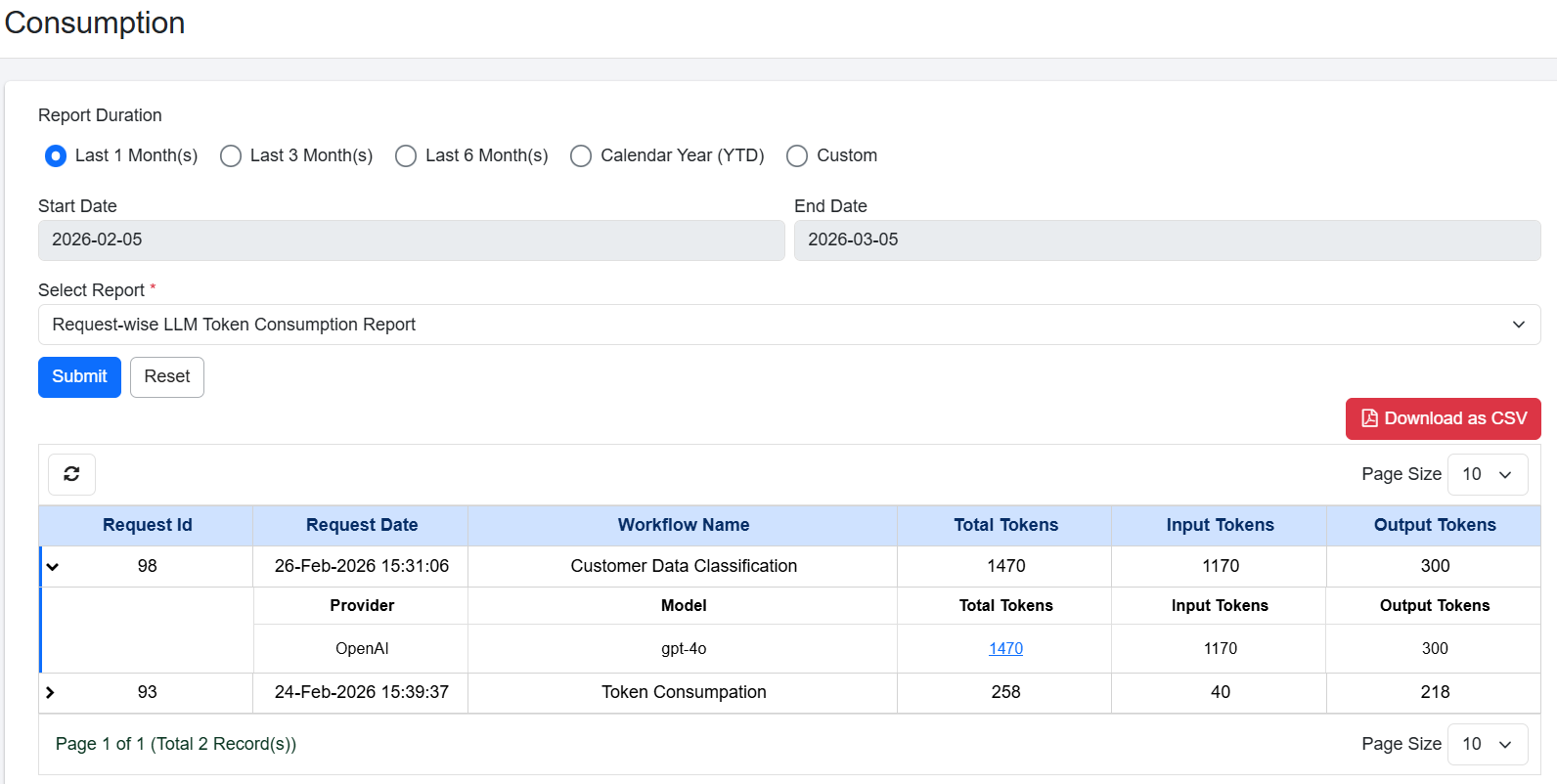
Request-Wise LLM Tokens Consumption Report view
| Column name | Description |
|---|---|
| Request Id | Displays a unique identifier assigned to each request. |
| Request Date | Displays the date and time when the request was created. |
| Workflow Name | Displays the name of the workflow that used LLM tokens. |
| Total Token | Displays the total number of tokens consumed by the request. |
| Input Token | Displays the number of tokens used by the text or prompt that you send to the LLM. |
| Output Token | Displays the number of tokens used by the response generated by the LLM. |