Work with IP Whitelisting
IP Whitelisting lets you restrict which agents can communicate with the AE Server based on their IP address, adding a network-level security layer to your automation infrastructure. By default, agents from any IP address can connect to the server — which may not meet your organization's security requirements. You can define allowed IP addresses, IP ranges, or CIDR notations at the tenant level to ensure only agents from trusted networks can register, start up, and communicate with the server. The validation happens at agent registration, agent startup, and periodically during operation. This helps you enforce network security policies and prevent unauthorized agents from accessing your automation platform.
To add or modify the IP whitelisting values:
-
In the menu, click Agents → IP Whitelisting. The IP Whitelisting page appears.
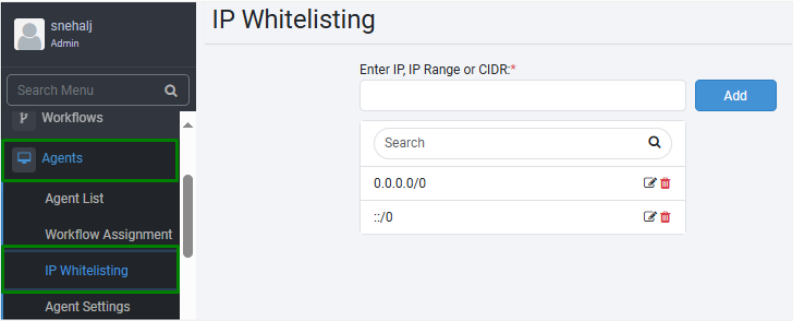
IP Whitelisting page
-
On the page, enter whitelisting values, as IP, IP Range, or CIDR Notation, as required:
- IP: Enter the IP address that you want to whitelist. For example, 192.168.0.0.
- IP Range: Enter the range of IP addresses separated by hyphen that you want to whitelist. For example, 192.168.0.0 - 192.168.0.100.
- CIDR Notation: Enter the CIDR Notation. For example, 192.168.0.1/24 or 192.168.0.0/16.
NoteYou can add multiple IPs using one or more options to add the the IP whitelisting details.
-
Click Add. The value appears in the list.
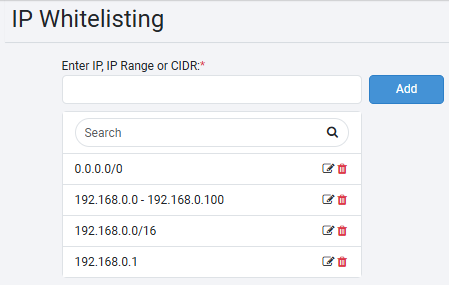
IP Whitelisting values added
Note- To update an existing value, click
 .
. - To delete an existing value, click
 .
.
- To update an existing value, click
Migration from Previous Versions
-
During Server migration for each of the tenants (other than SYSADMIN Tenant) that are present for migration, to add white listings as follows: 0.0.0.0/0
-
Perform Source IP Validations at the following levels:
-
Agent Registration: Verify the Source IP Address on Agent registration. For IP whitelisting specified for the Tenant during Agent registration, AE Server verifies the Source IP Addresses against this list. If the verification fails, Agent registration fails.
-
Agent Startup: Verify the Source IP Address on Agent Startup. If the Agent Source IP Address validation fails against the Agent IP Whitelisting list, then start-up fails.
-
Validate the Source IP per day for the first call.
-