Get Disk Utilization
Description
This step retrieves disk usage information from a remote Windows machine. It returns details like drive letter, total size, used space, and free space. Use this step in workflows that monitor disk health, generate capacity reports, or trigger alerts when disk usage exceeds a threshold.
Configurations
| No. | Field Name | Description |
|---|---|---|
| 1 | Step Name | Name of the step. This name has to be unique in a single workflow. |
| Connection | ||
| 1 | Start Node | Select the checkbox, if required. If selected, the step acts as a row-generating (input) step. You can specify a static value or an environment variable. If cleared, the step acts as an intermediate step. You can specify a static value, an environment variable, or select fields from previous steps. |
| 2 | Host | Provide the Hostname, Server Name, Fully Qualified Domain Name (FQDN), or IP address of the Windows machine. |
| 3 | Username | Specify the username of the Windows account to authenticate. You may also provide the username in the format <Domain name>\username or <Computer name>\username.To connect to a remote machine, use <Domain name>\username.This field is mandatory. |
| 4 | Password | Specify the password of the username. The password is stored in encrypted format in the AutomationEdge workflow file. This field is mandatory. |
Output Tab
| No. | Field Name | Description |
|---|---|---|
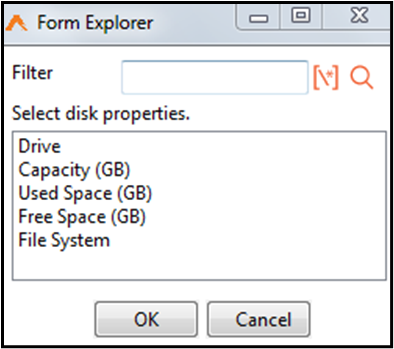
| 1 | Property Name | Click this field to open a Form Explorer window with disk utilization properties. Property Name is mandatory. |
| 2 | Output Field | Specify an output field to hold the result values for the property. This field is mandatory. |