AW: Deactivate Enrollment User
Description
This step deactivates an existing enrollment user in AirWatch. You provide the enrollment username, and the step changes their status to inactive. Use this step in offboarding workflows that need to revoke mobile device access when an employee leaves the organization or no longer needs enrollment.
Configurations
| Field name | Description |
|---|---|
| Step name | Specify a unique name for the step. |
| CONNECTION tab: | Description |
| Base URL | Specify the fully qualified Domain Name or IP address of machine. Specify the AirWatch instance server name. Specify the AirWatch instance Server URL. For example, https://cn1106.awmdm.com Or IP address of the AirWatch instance. The field is mandatory. |
| Username | Specify a username to authenticate the AirWatch instance. For example, xx.xx@automationedge.com.The field is mandatory. |
| Password | |
| Accept value as variable/static | Specify or select the password, as required. If the Accept Value as variable/static checkbox is selected, then the password field appears as a text box and accepts static or variable values. OR If the Accept Value as variable/static checkbox is clear, then the password field appears as a dropdown in which you can select a field from the previous steps. |
| API Key | |
| Accept value as variable/static | Specify or select the password, as required. If the Accept Value as variable/static checkbox is selected, then the API Key field appears as a text box and accepts static or variable values. OR If the Accept Value as variable/static checkbox is clear, then the API Key field appears as a dropdown in which you can select a field from the previous steps. Note: API Key is available in system settings when REST API access is enabled in AirWatch and is needed to integrate VMware Identity Manager with AirWatch. Username, Password, and API Key for AirWatch instance are validated. |
| INPUT tab: | Input Field |
| Enrollment Username | Specify the enrollment username which you want to deactivate. Existing enrollment users can be found by navigating to Accounts → Users → List View menu in AirWatch. 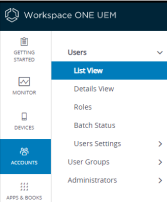 |