Assign Workflow Permissions
In the topic, you’ll learn how to assign workflow permissions.
To assign workflow permissions:
-
In the menu, click Permissions Manager → Workflow Permissions. The Workflow Permissions page appears.
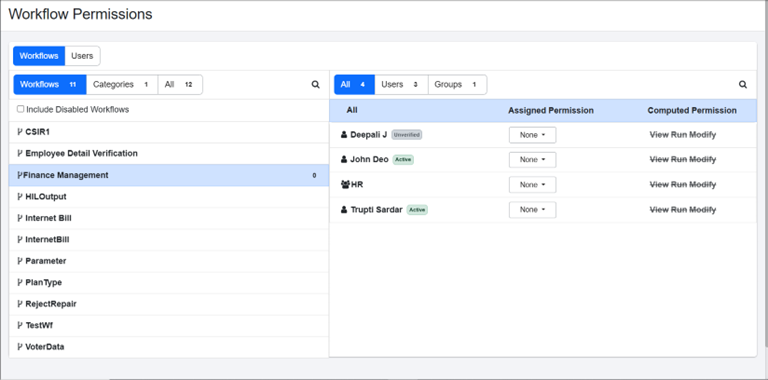
Workflow Permissions page
-
Click Workflows tab, and in the section, select All or Workflows or Categories sub-tab. Respective tabs lists the following:
-
Workflows (
 ): Lists all workflows.
 -
Categories (
 ): Lists all categories.
 -
All: Lists all workflows and categories.
-
-
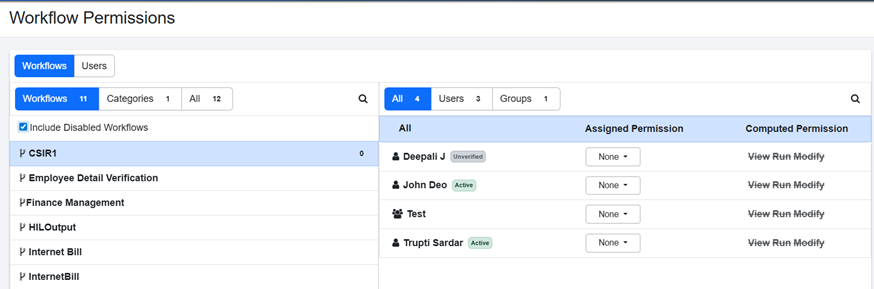
Select the workflow or category for which you want to assign permissions to users or groups.
NoteTo view the list of disabled workflows, select the Include Disabled Workflows checkbox.
-
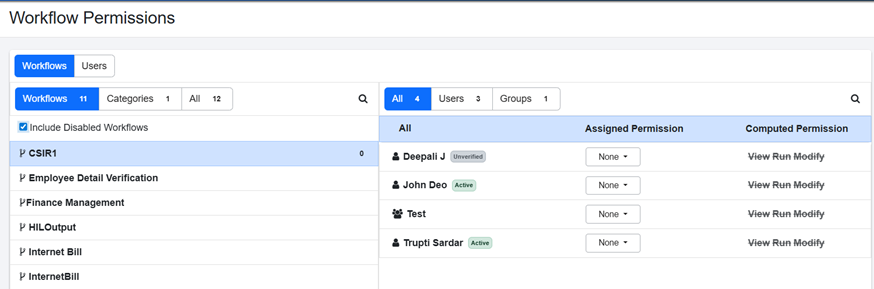
In the right pane, select All or Users or Groups sub-tab. You will see the following under each sub-tab:
-
All: Lists all users and groups.
-
Users (
 ): Lists all users.
 -
Groups (
 ): Lists all groups.
-
-
In the Assigned Permission column, select the permission you want to assign to the user and / or user group for the selected workflow or category. Available options are View, Run, and Modify.
NoteIn the Computed Permission column, view the maximum permissions assigned to the users or user groups or categories or workflows.
-
Click Save. The permissions are saved successfully.
Note-
The user state is displayed next to the username.

-
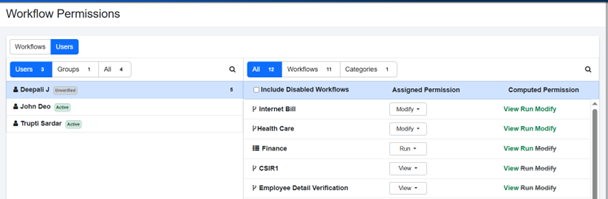
Click Users tab to similarly assign permissions to the users or groups for workflows and categories.
-
To remove the permissions to categories and / or workflows, select None in the Assigned Permission column. The permission is struck out and greyed indicating that the permissions are removed.
Permissions:
- View: Allows users only to view the workflows.
- Modify: Allows users to view and edit the workflows.
- Run: Allows users to view and execute the workflows.
-