Common Activity
In the topic, you will learn about the common activities which are similar throughout the AutomationEdge server.
Search
You can find tenants, users, workflows, plugins, and so on using the option to search. For a simple search, enter the value, such as name of the user or workflow in the search box on the page and click search. The specific search result appears on the page.
The simple search displays results only for the current page. For example, if you are searching for a plugin, GUI Automation which is not listed on the current page, say page 1, then the search will not fetch the record even if the plugin is uploaded and listed on another page, say page 10. However, you can perform a refined search through the Advance Search option.
Advanced Search
If you have a huge amount of information, then advance search allows you to apply filters and helps to narrow down the search.
To perform advanced search:
- On the page, click Advanced Search. The fields to enter filter criteria appear.
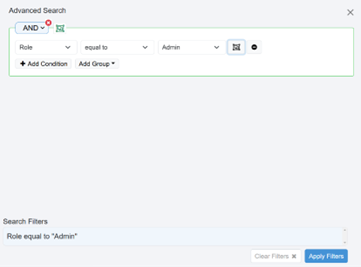
Figure: Advanced Search
- Enter the following field details:
| Field name | Description |
|---|---|
| Column Name | Select the column on which you want to search for the details. For example, Org Code. |
| Criterion | Select the comparator criterion on which you want to search for tenant details. For example, equal to. |
| Search Phrase | Enter the phrase on which you want to search for the details. |
- Click Apply Filter. The filter is added based on which the details are fetched.
Click  to create a group and add condition to the group.
You can add different conditions to the group.
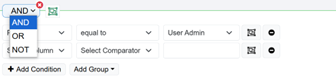
Click  to Remove Condition. To clear the filter criteria, click Clear Filters.