Masking
Description
This step is used to mask Aadhar input files.
Example:
In the following example, the input file is selected, and if it's multipage, 'Page 1' of the Aadhar card is to be masked with black color. The masking regions are determined from coordinate details.
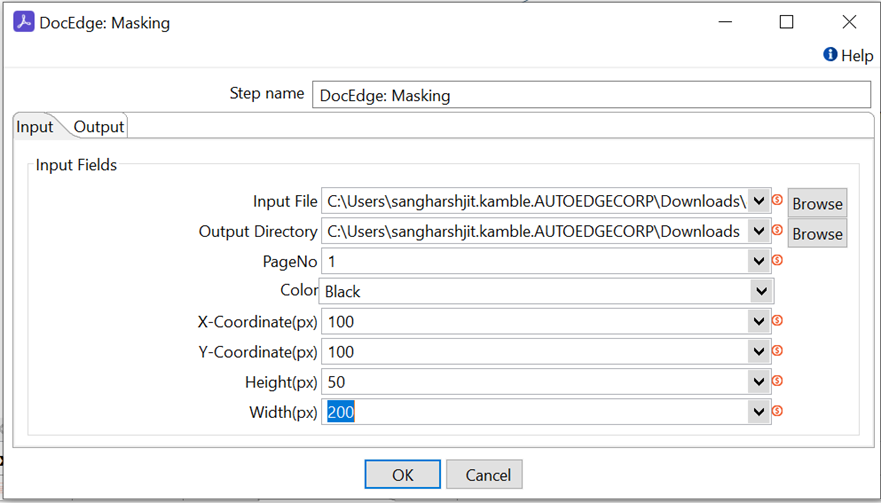
Configurations
| No. | Field Name | Description |
|---|---|---|
| 1 | Step Name | Name of the step. This name must be unique in a single workflow. The field is mandatory. |
| Input Fields | ||
| 1 | Input File | Input file path The field is mandatory. |
| 2 | Output Directory | Output folder path where output files gets saved. The field is mandatory. |
| 3 | PageNo | Provide page number to mask multipage file. Default 1 is use. The field is mandatory. |
| 4 | Color | Select color for masking i.e. Orange, white, black. Default value is black. The field is mandatory. |
| 5 | X-Cordinates(px) | X – coordinates of boinding box. Pixel position for masking. |
| 6 | Y-Cordinates(px) | Y- coordinates of boinding box. Pixel position for masking. |
| 7 | Height(px) | Height of bounding box in pixels. |
| 8 | Width(px) | Width of bounding box in pixels. |
| Output Tab | ||
| 1 | Output Field | Output file path. Default value: “outputFilePath;” |