Classify Documents
Description
This plugin step is used to classify documents based on text extracted from plain text files, Azure OCR text, Google Vision OCR text, and digital PDFs.
Example
In the following example, provide classes as keys and their respective matched values present in the extracted text. For example, 'Vi' is a class and 'your Vi bill' is a matched text.
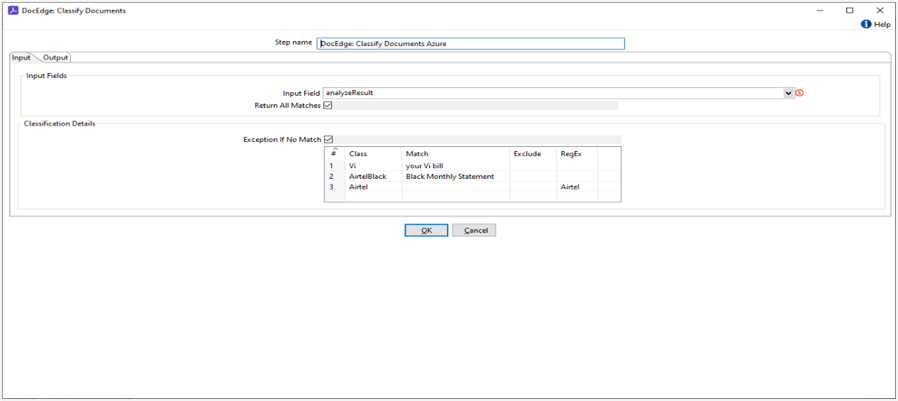
Configurations
| No. | Field Name | Description |
|---|---|---|
| 1 | Step Name | Name of the step. This name must be unique in a single workflow. The field is mandatory. |
| 1 | Input Field | Input text from all input sources. The field is mandatory. |
| 2 | Return All Matches | If checked, return all matching classes from the provided text; otherwise, return the first matched class. |
| 3 | Classification Details: | |
| 4 | Exception If No Match | If checked and no class match is found, raise an exception. If unchecked, return an empty output. |
| 5.1 | Class | Specify a user-defined class name to be returned upon a match. Multiple classes can be added. The field is mandatory. |
| 5.2 | Match | Specify a keyword to match against the input text for a specific class. The field is mandatory. |
| 5.3 | Exclude | Specify a keyword to match against the input text; if found, the class will be excluded from the output. Example – if we want to exclude new line character then use “\n”. The field is mandatory. |
| 5.4 | RegEx | Regular expressions will be used instead of a direct match. If found, the class will be returned as output. |
| Output Fields | ||
| 1 | Output Field | Comma separated list of classes. Default value: OutputClass |