Switch to Shadow Host
Description
Use the Switch to Shadow Host step to switch the execution context between the main DOM and a Shadow DOM. The step allows subsequent Web-GUI steps to locate and interact with elements inside open Shadow DOMs that are not accessible from the main document. The step supports both single and nested (multi-level) shadow hosts.
A Shadow DOM isolates a web component from the main page. As a result, standard locators cannot access elements inside it. Use this step to automate web applications that use custom web components.
- Every Web-GUI step between Shadow-Host and Default automatically interacts with elements inside the Shadow DOM. No additional shadow host configuration is required for these steps.
- Auto-continue: If another Switch to Shadow Host step is set to Shadow-Host, it continues from the previously selected shadow root.
- The XPath is not supported inside a shadow host. Use only CSS, ID, ClassName, Name, and TagName locators. The limitation applies to both the Shadow Host Path table and all Web-GUI steps executed inside the shadow context.
- When using a Switch Frame step to access an iframe within a shadow context, use only the CSS selector.
- Closed shadow hosts are not supported.
Only one shadow context can be active during a workflow run, and it is shared across all browser instances. For multi-browser workflows, add a Switch to Shadow Host step set to Default to clear the shadow context before interacting with a different browser.
Configurations
| Field Name | Description |
|---|---|
| Step name | Specify a unique name for the step. The label identifies the step within the workflow and helps you reference it when debugging or linking steps. |
| Web browser name | Select the web browser or driver instance to act on. The selection must match the one specified in the Start Browser step. The field is mandatory. |
| Switch to | Select the operating mode: • Shadow-Host: Enters the shadow host(s). Selecting this option displays the Shadow Host Path table. • Default: Exits the shadow context and returns to the normal page. |
| Shadow Host Path: | Add one row for each shadow host. List the hosts from the outermost (parent) to the innermost (child). For example: The following example shows a nested Shadow DOM structure with three shadow hosts: Host A, Host B, and Host C. 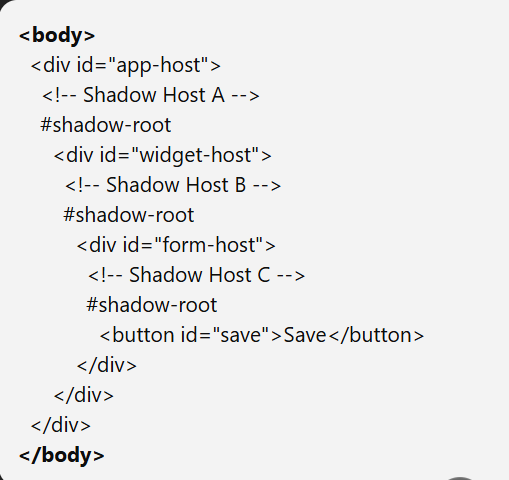 In the example, The Save button is inside all three nested shadow hosts. Add the shadow hosts to the Shadow Host Path table in order, starting with the outermost host (Host A) and ending with the innermost host (Host C). 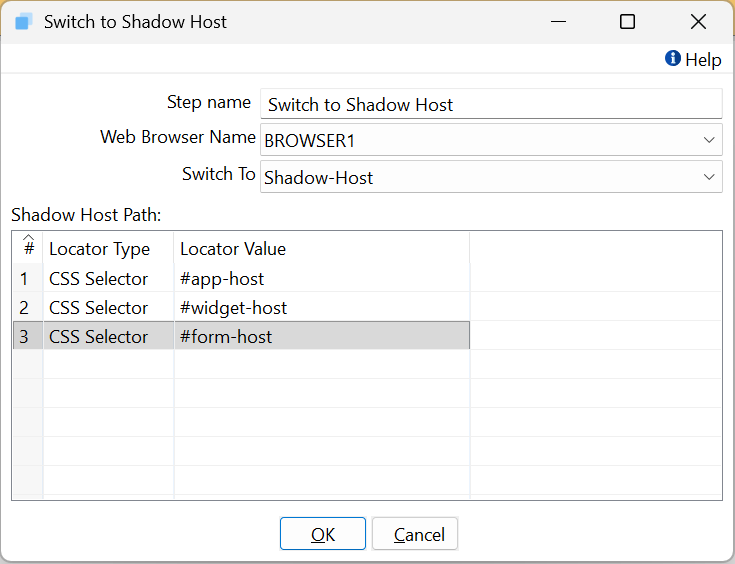 |
| Locator Type | Select the locator type used to identify the shadow host. • CSS • ID • ClassName • Name • TagName |
| Locator Value | Specify the locator value for the corresponding host. |