Stream Lookup
Description
Stream Lookup enriches the primary data stream by looking up and adding fields from a second source step based on common key fields. The lookup data is cached in memory for fast access, making this step ideal for joining a main data stream with a smaller reference dataset — for example, adding product names from a text file to transaction records from a database, or appending category labels to raw data rows. Unlike Database Lookup, this step works entirely within the workflow stream without requiring a database connection for the lookup source.
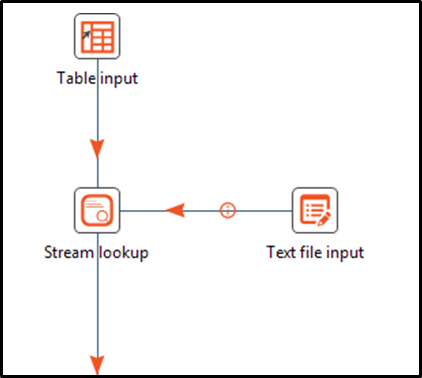
Note: Consider using the Database Lookup step when the Lookup step originates from a table. In this case, it is faster to use the Database Lookup step and enable the option. Load all data from table that preloads the cache.
If there are multiple matching records in the Lookup step data having same keys, then by default the last matched record will be fetched by the step. Enable the Fetch First Matched Record checkbox to fetch the first matched record
Configurations
| Field Name | Description |
|---|---|
| Step name | Specify the name of the step this name has to be unique in a single workflow |
| Lookup step | Specify the step name where the lookup data is coming from |
| The keys to lookup... | Specify the names of the fields that are used to look up values. Values are always searched using the "equal" comparison |
| Fields to retrieve | Specify the names of the fields to retrieve here, as well as the default value in case the value was not found or a new field name in case you didn't like the old one. |
| Preserve memory | Enabling this checkbox encodes rows of data to preserve memory while sorting. |
| Radio Button 1: Key and value are exactly one integer field | Preserves memory while executing a sort by. Note: Works only when "Preserve memory" is checked. Cannot be combined with the "Use sorted list" option below. |
| Radio Button 2: Use sorted list | Enable to store values using a sorted list; this provides better memory usage when working with data sets containing wide row. Note: Works only when "Preserve memory" is checked. Cannot be combined with the "Key and value are exactly one integer field" option. |
| Fetch First Matched Record | Enabling this checkbox will fetch the matched record from the Lookup Step. |
| Button: Get fields | Automatically fills in the names of all the available fields on the source side (A); you can then delete all the fields you don't want to use for lookup. |
| Button: Get lookup fields | Automatically inserts the names of all the available fields on the lookup side (B). You can then delete the fields you don't want to retrieve |