Catch
Description:
Catch intercepts all unhandled errors that occur between a paired Try step and itself in a workflow. Instead of letting errors terminate the workflow, Catch routes each error to a specific target step based on its error description, error code, or both. This makes it possible to build resilient automations that recover gracefully -- for example, retrying a failed operation, logging the error and continuing, or branching to an alternate path. You can define a default success step for rows that pass through without errors, a default error step for unmatched errors, and enable partial matching to catch errors by keyword rather than requiring an exact match.
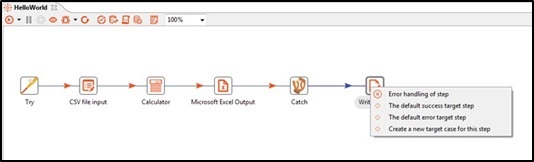
Once an error case is added in the Catch table in the Configuration tab, it also appears in the output hop options as the case target for the specified Error Description and Error Code.
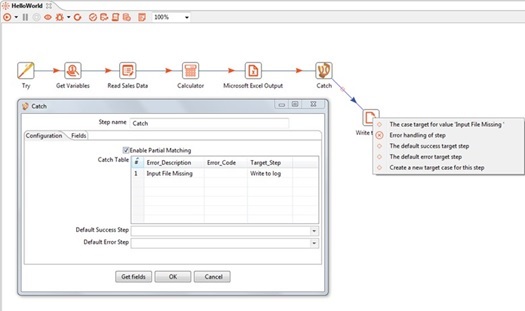
Configurations:
| Field Name | Description |
|---|---|
| Step Name | Name of the step. This name has to be unique in a single workflow. |
| Configuration Tab | |
| Enable Partial Mapping | Enable checkbox to compare the errors partially with the error received, |
| Catch Table: | This table contains the details of how the errors have to be routed. The priority depends on the sequence. The fields in this table are not mandatory. |
| Error_Description | Specify a full or partial error description to handle. |
| Error_Code | Specific plugin error code to handle. If the Error description and Error Code are specified in a single entry, both will be verified before forwarding to the target step. |
| Target_Step | The target step to move to or traverse when the error occurs. |
| Default Success Step | If there aren't any errors in between Try - Catch, the row will be forwarded to the step specified here. This field is not mandatory. |
| Default Error Step | If the error occurred does not match any entries in the 'Error Handling' table, the row will be forwarded to the step specified here. This field is not mandatory. In case this field is empty, the workflow terminates at the 'Catch' step with the error which is received by the 'Catch' step. |
Open Step error handling settings for any step with Error handling option enabled in the popup navigation, between Try-Catch steps as seen below. The various Error Handling field names are pre-populated (and disabled) by Try-Catch as seen below.
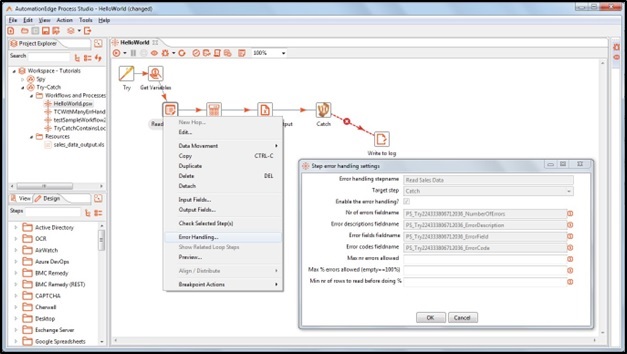
These Error Handling field names are generated by Try-Catch. These field names can be changed by configuring with user defined names in the Fields tab.
| Fields Tab: | ||
|---|---|---|
| Field Name | Description | |
| Error Handling Fields: | These fields may be configured to be used further in the workflow. If any field is not specified it will be lost after the Catch step. | |
| Number of Errors | Specify a field name to hold No of errors ocurred step with error. | |
| Error Description | Specify a field name to hold Error Description. | |
| Error Field | Specify a field name to capture the error fields. | |
| Error Code | Specify a field name to store error codes. | |
| Custom Error | Specify field name to hold custom error message. The field will be available for the next step. Note: To use the custom error message, use the step with Process Studio version 8.1 or later. | |
| Error Step Name | Specify a field name to hold Step name on which errors occurred. | |
| Tabular Fields: | Choose the fields to be forwarded by Catch step | |
| Field Name | You may populate previous step fields by clicking on the get Fields button. You may remove fields you do not want to forward by the Catch step. | |
| Default Values | Specify field values to be assigned in case of errors. | |
| Common Buttons: | ||
| Buttons | ||
| Get Fields | Click Get Fields button to get previous step fields. | |
| OK | On click of this button. It will check the field values. If any required field values are missing then it will display validation error message. If all the required field values are provided then it will save the field values. | |
| Cancel | On click of this button, it will cancel the window and does not save any values. |