Desk Manager
Introduction
The Desk Manager plugin connects workflows to the Desk Manager system. It allows you to create service requests, search tickets, and update existing tickets directly from a workflow. The plugin uses Desk Manager APIs and supports both form-based inputs and raw JSON for advanced use cases.
Prerequisites
- The Base URL of your Desk Manager instance (for example, https://api.desk.ms).
- A valid Operator API Key from Desk Manager.
- A valid Environment API Key from Desk Manager
Note Use following steps to get the Operator API Key and Environment API Key:
- Log in to Desk Manager.
- Click Apps, and then select Panel (Painel) from the list.
- In the left pane, click Operator (Operador). The list of operators appears in the right pane.
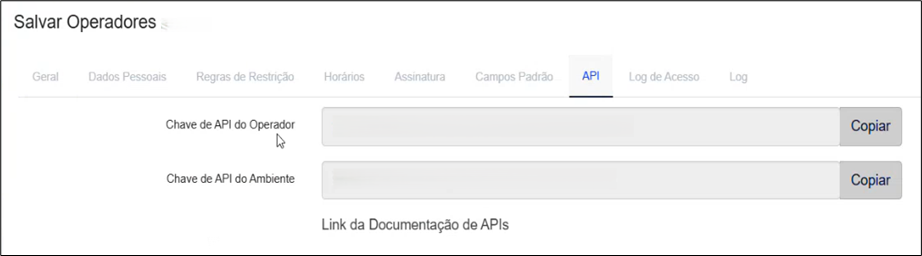
- Select the required operator, click the API tab, and view the Operator API Key (Chave de API do Operador) and Environment API Key (Chave de API do Ambiente). For example,
Common Tab Details: Connection tab
The following table explains the Connections section and its field details, which is a common configuration available across steps.
| No. | Field Name | Description |
|---|---|---|
| 1 | Base URL | Specify the root URL of the Desk Manager. For example, https://api.desk.ms The field accepts variable or static value, and the field is mandatory. |
| 2 | Operator API Key | Specify the API key of the operator performing the action. The field accepts variable or static value, and the field is mandatory. Note: If the checkbox Accept Value as variable/static is selected, then the password field appears as a text box and accepts static or variable values. OR If the checkbox Accept Value as variable/static is clear then the password field appears as a dropdown in which you can select a field from the previous steps. |
| 3 | Environment API Key | Specify the global environment API key for the Desk Manager instance. The field accepts variable or static value, and the field is mandatory. Note: If the checkbox Accept Value as variable/static is selected, then the password field appears as a text box and accepts static or variable values. OR If the checkbox Accept Value as variable/static is clear, then the password field appears as a dropdown in which you can select a field from the previous steps. |
| 4 | Test connection | Click to validate the connection by authenticating with the Desk Manager API and display a success or error message. Note: The Desk Manager API does not validate the Operator API Key during this authentication phase. Therefore, "Test Connection" may return "Success" even if the Operator API Key is invalid. If the Operator Key is incorrect, the connection test will pass, but the specific step (e.g., Create Request) will fail during workflow execution with error as "Response: Token do operador não existe". |