Get Disk Utilization
Description
Windows: Get Disk Utilization plugin step returns the utilization of logical disks on a local or remote windows machine. This is a row generating step.
Configurations
| No. | Field Name | Description |
|---|---|---|
| 1 | Step Name | Name of the step. This name has to be unique in a single workflow. |
| Connection | ||
| 1 | Start Node | Select the checkbox, if required. If selected, the step acts as a row-generating (input) step. You can specify a static value or an environment variable. If cleared, the step acts as an intermediate step. You can specify a static value, an environment variable, or select fields from previous steps. |
| 2 | Host | Provide the Hostname, Server Name, Fully Qualified Domain Name (FQDN), or IP address of the Windows machine. |
| 3 | Username | Specify the username of the Windows account to authenticate. You may also provide the username in the format <Domain name>\username or <Computer name>\username.To connect to a remote machine, use <Domain name>\username.This field is mandatory. |
| 4 | Password | Specify the password of the username. The password is stored in encrypted format in the AutomationEdge workflow file. This field is mandatory. |
Output Tab
| No. | Field Name | Description |
|---|---|---|
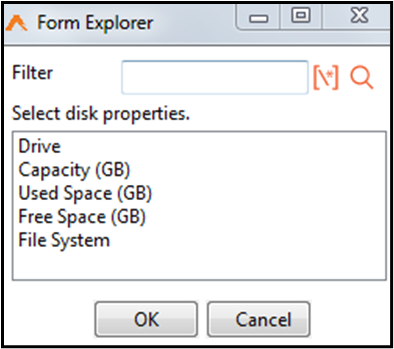
| 1 | Property Name | Click this field to open a Form Explorer window with disk utilization properties. Property Name is mandatory. |
| 2 | Output Field | Specify an output field to hold the result values for the property. This field is mandatory. |